A real-money neobank
Trading, card payments, staking and custody.
A practice-trading concept that pairs live market prices with simulated funds, clear feedback and guided learning.
Designed to build genuine confidence before putting capital at risk, turning complex market mechanics into an approachable, educational routine.
Live prices. Simulated funds.
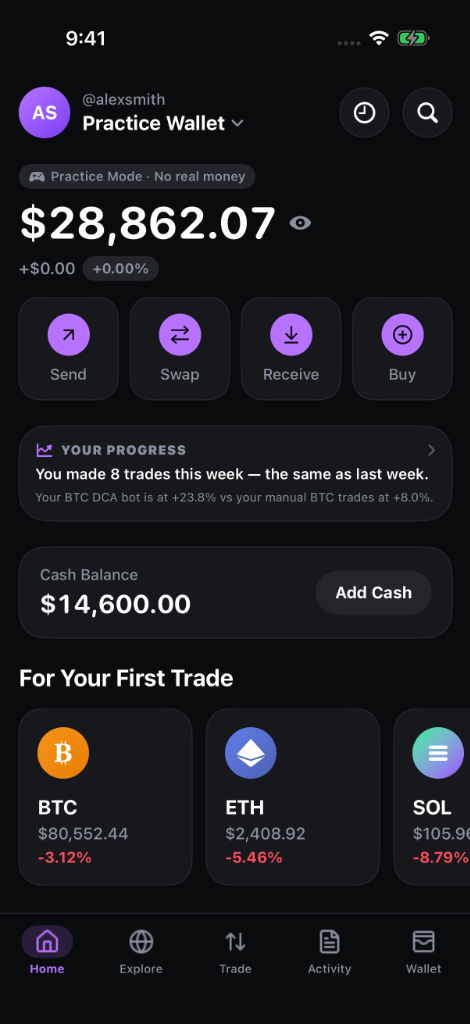
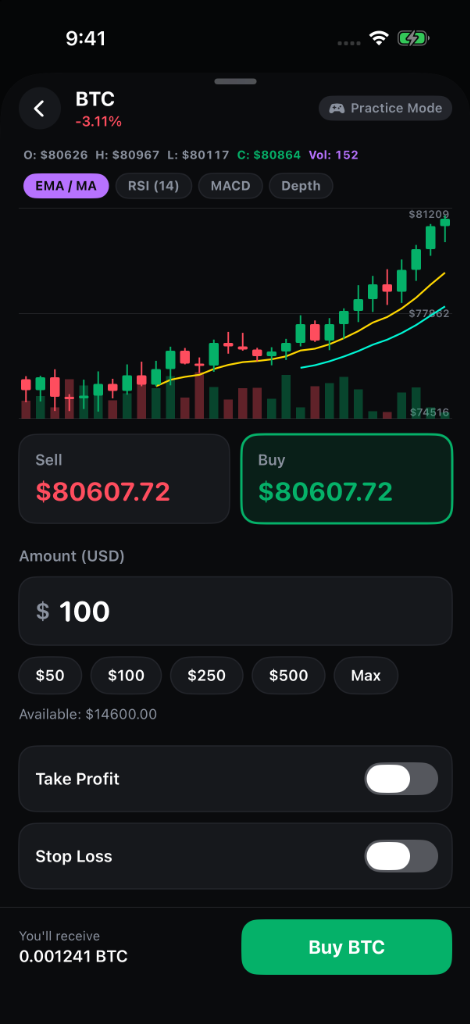
High-fidelity interactions recorded directly from the iOS prototype—featuring live trade entry, risk controls, and automated DCA setup.
The original concept combined real crypto trading, a payment card, staking and a wallet. For a solo designer, it introduced dependencies on regulated services, custody and commercial partners before the core learning experience could be tested.
The beginner problem was simpler: how do you learn the mechanics of trading without using real savings to discover your mistakes?
I reframed the concept as a simulator: users practise with virtual funds while following market prices. The shift made learning the purpose of the product, rather than a step toward a real-money transaction.
Trading, card payments, staking and custody.
Virtual funds, order practice, portfolio feedback and simulated recurring plans.
This is a product-scope decision, not a legal determination. Any future launch would still need a review of applicable requirements.
The source describes desk research and a review of Binance Demo, Bybit Demo, Pi42, Delta Exchange and TradingView paper trading. The design hypothesis was that a beginner-focused experience could make practice easier to understand than a trading interface built primarily for experienced users.
Can users distinguish practice funds from real money?
Can they understand an order and its outcome?
Does the interface explain market-data and account limits?
These were inputs to the design, not findings from completed user interviews.
The personas are hypotheses to test, not validated research segments.
Wants to try trading without losing money they cannot afford to risk.
Wants to explore a recurring plan before committing real funds.
Wants to practise order types without putting capital at risk.
Needs a clear answer to what is real, simulated and paid.
A required onboarding explanation and persistent practice labels add a step, but address the most important trust question.
Live market data is the intended default. A clearly labeled simulated fallback is proposed for interruptions.
The proposed Free tier caps individual trades at $2,000 and daily activity at $10,000. The limit message should explain what happened before offering Prime.
An OLED-inspired dark palette supports the product direction. Contrast checks determine usable text colors.
The source describes reducing 28 feature areas to about 10. Tax reports, NFTs, hardware wallets and a DApp browser were outside the proposed core.
Home leads with “Practice Wallet” and places a first-trade entry point close to the available balance.
The account label makes the simulated context visible at the top of the screen.
A dedicated first-trade row gives beginners a starting point.
Wallet and cash balances appear together. The numbers shown are screen examples, not actual funds.
The trade flow introduces market and limit orders with simulated funds. The amount, conversion and next action are grouped in one view.
A prominent amount provides a clear focal point before confirmation.
Remaining daily capacity is visible near the order details.
The recurring-order option explicitly refers to simulated funds.
The proposed advisor combines a portfolio score, explanatory feedback and allocation comparisons. Its usefulness and the clarity of its guidance still need validation.

Diversification, volatility and cash cushion provide context for the headline number.
Current and target allocations make the proposed change visible.
The screenshot shows a concept. It does not demonstrate the accuracy of the model or financial guidance.
The automation view lets the cautious-saver persona explore recurring purchases in a simulated account.

Each plan displays its frequency, amount and asset.
Invested and accumulated values sit with the associated strategy.
Recurring plans should remain clearly distinguished from real-money automation.
The BitcoBit visual language pairs a high-contrast dark foundation with a vibrant lavender brand accent, deliberate green/red trading feedback, and multi-tier surface elevations designed specifically for mobile OLED screens.
Action buttons, state toggles, and status badges draw from semantic tokens rather than hardcoded hex values.
Canvas (#0A0B0D) → Card (#141518) → Interactive Control (#1C1D24) create effortless visual depth without harsh borders.
Mint green (#00C076) and coral red (#FF3B30) reserve high-saturation moments exclusively for market movements and order status.
Dark ink on primary lavender buttons achieves a 9.2:1 contrast ratio, ensuring readable interactions in all lighting.
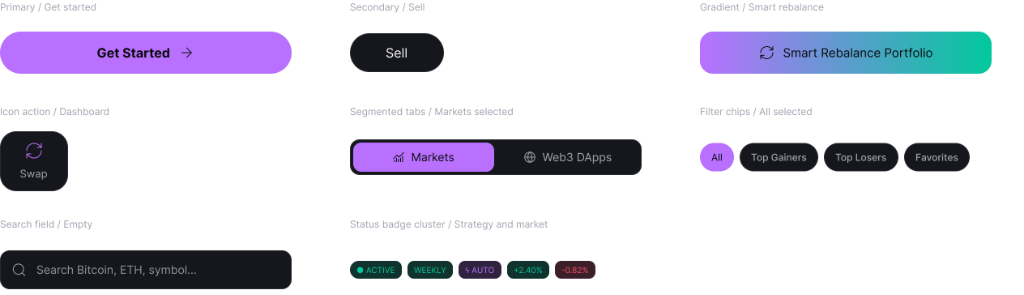
A financial practice simulator requires rapid information retrieval, unmistakable feedback loops, and touch ergonomics engineered for volatile market moves. I structured 30+ production component variants across 5 modular categories—optimized specifically for OLED dark surfaces, tap target precision, and live state clarity.
Every interactive trigger meets Apple HIG standards with a minimum 44×44 pt touch target, mitigating mis-taps during fast market swings.
Primary Lavender (#B772FF) handles general actions, while Buy Mint (#00C076) and Sell Crimson (#FF3B30) reserve high saturation strictly for financial intents.
Rest, active, focused and disabled states communicate clear tactile boundaries so beginners never second-guess whether an action executed.
5 production kits containing 30+ reusable atomic components and complex UI modules designed in Figma.
Primary CTA pills, secondary dismissals, gradient smart rebalancers, segmented tabs, chip filters, search inputs, and status badges.
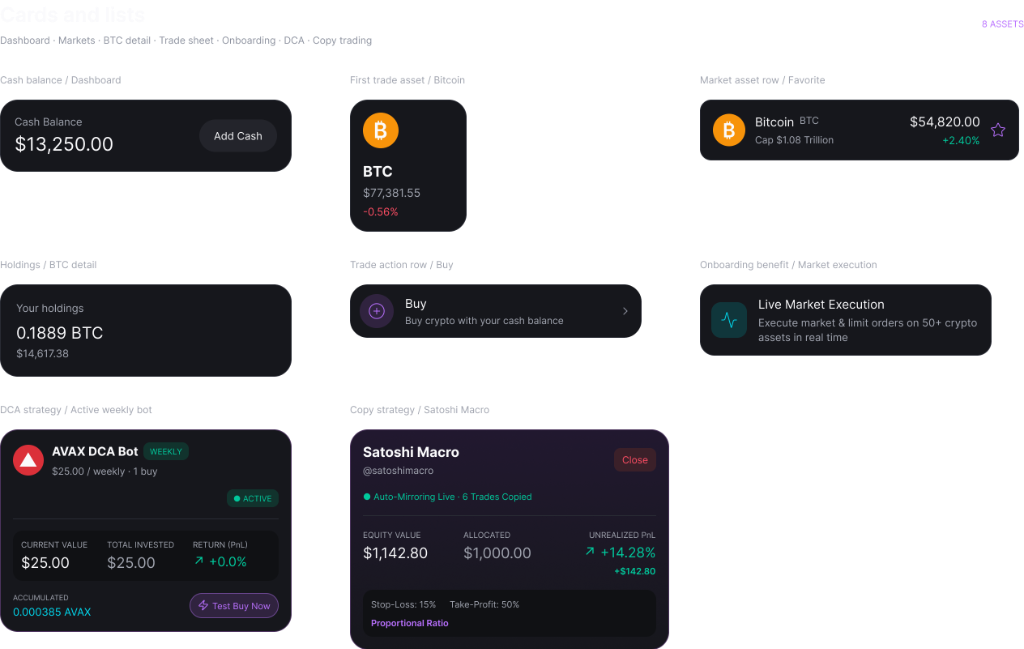
Cash balance hero, asset holding rows, live market row with favorite star, first-trade entry banner, DCA bot card, and copy portfolio card.
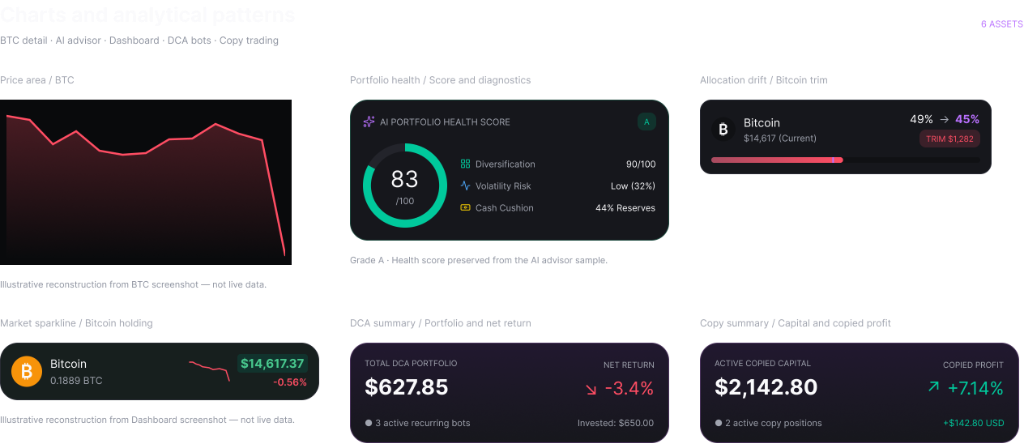
Price area spline with crosshairs, 83/100 circular health gauge, allocation drift rebalance alerts, mini sparklines, and strategy summaries.
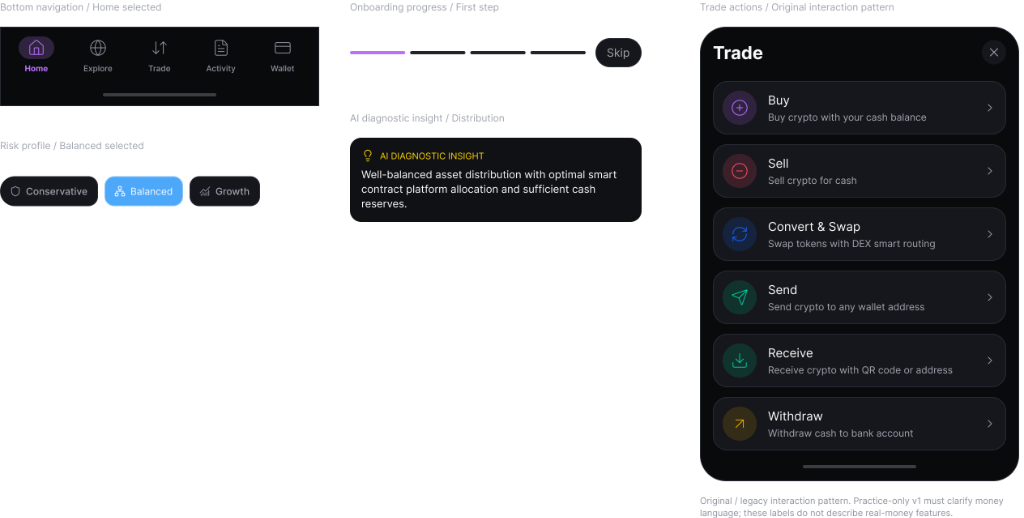
5-tab floating bottom navigation dock, draggable trade action modal sheet, risk tolerance selectors, AI diagnostic alerts, and onboarding step pills.
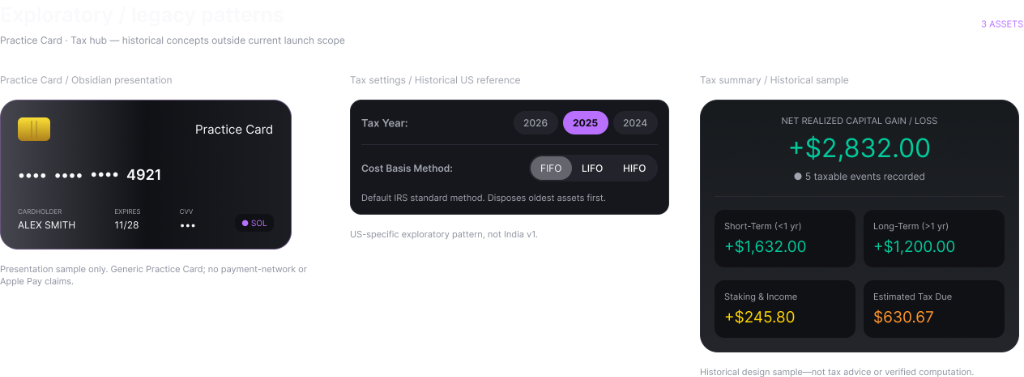
Obsidian simulated virtual debit card, tax year & accounting cost-basis (FIFO/LIFO/HIFO) settings, and net realized capital gains summary.
The proposed moderated study includes six participants and eight tasks. The PDF describes it as in progress, but its result fields are blank. No completed usability results are claimed here.
| Task | Proposed target | Result |
|---|---|---|
| Understands that no real money is involved | 6 of 6 participants | Not provided |
| Completes a first buy without help | 90% or more | Not provided |
| Explains the Free-tier cap | 80% or more | Not provided |
| Finds recurring plans without a hint | 70% or more | Not provided |
| System Usability Scale score | 68 or higher | Not provided |
Scope reported in the PDF. Four distinct screen types are shown in this case study.
Reported audit result. Tertiary text remains a known issue.
No adoption, retention or business-impact results are available.
The source also reports 26 trademark references flagged across seven files. The underlying files were not supplied, so that count has not been independently checked.
A clearer product definition made the interface easier to explain. Removing real-money features created room to focus on practice, feedback and trust.
Features that dilute the practice story can weaken the whole experience.
Practice labels and honest data states should reinforce the same promise throughout the journey.
A visually convincing dark theme can still contain low-contrast text.
Next: run the study, address tertiary-text contrast, verify the product’s launch requirements and investigate an Android version.
For product design, design systems, prototypes and AI-powered design workflows.
Email me →